SOFTWARE SIMULATION TRAINING THAT BUILDS PROFICIENCY - NOT JUST FAMILIARITY

A system walkthrough tells employees what the software does. A simulation makes them do it – in a safe environment, without the risk of corrupting live data, triggering real-world errors, or discovering their training gaps at the worst possible moment: go-live. The difference between a software rollout that embeds quickly and one that results in months of error correction, support tickets, and quiet workarounds is almost always the quality of training.

Constellar designs software simulation eLearning for global enterprises – replicating the look, feel, and logic of your actual systems so employees can practise real workflows before they need to perform them. Role-based, accurate, and built around the Show-Try-Test methodology that progressively builds confidence rather than just demonstrating it.

ERP System Training
CRM Platform Training
Custom & Proprietary Software
Rollout & Migration
Compliance-Critical Software
Show-Try-Test Methodology
Pre-Go-Live Readiness
Role-Based Training
ERP System Training
CRM Platform Training
Custom & Proprietary Software
Rollout & Migration
Compliance-Critical Software
Show-Try-Test Methodology
Pre-Go-Live Readiness
Role-Based Training
ERP System Training
CRM Platform Training
Custom & Proprietary Software
Rollout & Migration
Compliance-Critical Software
Show-Try-Test Methodology
Pre-Go-Live Readiness
Role-Based Training
ERP System Training
CRM Platform Training
Custom & Proprietary Software
Rollout & Migration
Compliance-Critical Software
Show-Try-Test Methodology
Pre-Go-Live Readiness
Role-Based Training
ERP System Training
CRM Platform Training
Custom & Proprietary Software
Rollout & Migration
Compliance-Critical Software
Show-Try-Test Methodology
Pre-Go-Live Readiness
Role-Based Training
ERP System Training
CRM Platform Training
Custom & Proprietary Software
Rollout & Migration
Compliance-Critical Software
Show-Try-Test Methodology
Pre-Go-Live Readiness
Role-Based Training
ERP System Training
CRM Platform Training
Custom & Proprietary Software
Rollout & Migration
Compliance-Critical Software
Show-Try-Test Methodology
Pre-Go-Live Readiness
Role-Based Training
ERP System Training
CRM Platform Training
Custom & Proprietary Software
Rollout & Migration
Compliance-Critical Software
Show-Try-Test Methodology
Pre-Go-Live Readiness
Role-Based Training

Training topics we cover - across ERP, CRM, and everything in between

Software simulation training is not one category. ERP simulation for a manufacturing plant looks completely different from CRM simulation for a sales team, which looks completely different from compliance-critical system training in a regulated environment. We design for the specific system and the specific user.

ERP System Training

Proficiency in enterprise resource planning platforms - SAP, Oracle, Microsoft Dynamics - through realistic, workflow-based simulations. Learners practise real transactions before working in the live system.

CRM Platform Training

Confident, consistent use of customer relationship management tools for sales and service teams - built around the workflows that drive pipeline visibility and customer data quality.

Custom & Proprietary Software Training

Simulations that mirror your organisation's own systems and interfaces - accurate, contextual training without touching live environments or risking data integrity issues.

Software Rollout & Migration Training

Structured simulation training that prepares employees for system transitions, upgrades, and new implementations - reducing the disruption and resistance that characterise under-prepared go-lives.

Compliance & Process-Critical Software Training

Training for systems where errors carry regulatory or operational risk - guided practice and error-recognition scenarios that build accuracy before employees enter the live environment.

Show-Try-Test Simulation Modules

Structured modules using guided demonstration, then guided practice, then independent assessment - building confidence progressively rather than testing for knowledge employees haven't had the chance to practice.

Pre-Go-Live Readiness Programmes

Structured pre-work simulation deployed ahead of go-live - front-loading foundational knowledge so live training time is spent on applied practice and edge cases, not basic navigation.

Role-Based System Training

Targeted modules focused on the specific processes, screens, and tasks relevant to each user role - avoiding the information overload of full-system training that most users will never need.
Cybersecurity Training Topics

Don’t see your specific system? We design software simulations across ERP, CRM, HRIS, proprietary, and custom platforms – contact us.

CONTACT US

Why software rollouts so often struggle long after go-live

Low adoption when employees lack confidence

Employees who reach go-live without genuine system proficiency revert to old processes - manual workarounds, parallel spreadsheets, the way things were done before. The technology investment remains in place; the behaviour change does not.

Errors in live systems from insufficient practice

Mistakes in production systems cause data integrity issues, compliance risks, and operational disruption. These are almost always preventable - and almost always more expensive to fix after go-live than to prevent through better pre-work.

Generic walkthroughs that ignore role-specific workflows

A full-system walkthrough shows every feature to every user - most of which is irrelevant to their specific role. The result is information overload, low retention, and employees who can navigate a demonstration environment but struggle with the actual tasks their job requires.

What effective software simulation training actually produces

WHAT GOOD TRAINING PRODUCES

  • Employees perform their specific job tasks in the system accurately and efficiently from day one
  • Time to competency on new systems is measurably reduced through structured pre-go-live practice
  • Errors in live systems are minimised through practice-based accuracy building
  • User confidence and adoption increase because employees can explore and practise safely
  • System processes are followed consistently, improving data quality
  • Simulation content remains accurate as the system configuration or version updates

HOW DO WE DESIGN FOR IT

  • Role-based simulation mapped to actual job tasks before any content is built – not a full-system demonstration applied to every role
  • Show-Try-Test methodology – proven in our Censhare CMS pre-work programme, which measurably reduced hands-on session time
  • Error-recognition scenarios and guided practice before live system access – addressing the most preventable source of post-rollout disruption
  • Risk-free simulation environments that remove the anxiety of making mistakes in a live system – a prerequisite for genuine adoption
  • Workflow-based simulation design focused on process consistency, not just interface familiarity
  • Modular simulation architecture – AI-assisted production keeps simulations current as systems evolve without full rebuilds

How we think about software simulation - the principles that drive genuine adoption

A simulation that doesn’t match the live system doesn’t just fail to help – it actively misleads.

A simulation that uses slightly different terminology, follows a marginally different workflow, or shows a different screen layout confuses employees when they reach the real system. Our senior instructional designers work directly from your system configuration to ensure every simulation accurately reflects naming conventions, workflows, and screens. AI-assisted tools help build realistic interface replicas efficiently; every simulation is validated against the actual system before deployment.

Show-try-test works because each stage builds the foundation for the next – skip a stage and the structure collapses.

Show (demonstration) builds understanding. Try (guided practice) builds procedure. Test (independent assessment) builds confidence. Demonstration alone produces passive familiarity. Practice without prior demonstration produces frustrating trial and error. Our senior IDs design every simulation module through the complete show-try-test structure – sequenced because the sequence is what makes it work. Our Censhare CMS pre-work programme demonstrates this: structured pre-work reduced hands-on session time measurably.

Role-based scoping makes simulation training effective and feasible – it is not a compromise.

Training every user on every feature of an ERP system overwhelms users and overspends budgets. Role-based simulation focuses on the screens and tasks each role actually uses – producing more effective training (relevant), faster to develop (scoped), and easier to maintain (modular). AI-assisted production supports building role-specific simulation variants efficiently once the scope is defined by senior designers.

The formats that build system proficiency - not system awareness

Software simulation requires practice-based formats. Formats that demonstrate software without practice produce employees who watched it being done, not employees who can do it.

Results that speak louder than promises.
Software simulation training across industries - how the challenge changes by sector

An ERP rollout in manufacturing has different complexity, stakes, and user profiles from a CRM rollout in financial services or a CMS deployment in a media organisation. We design for your specific system, your specific users, and your specific go-live context.
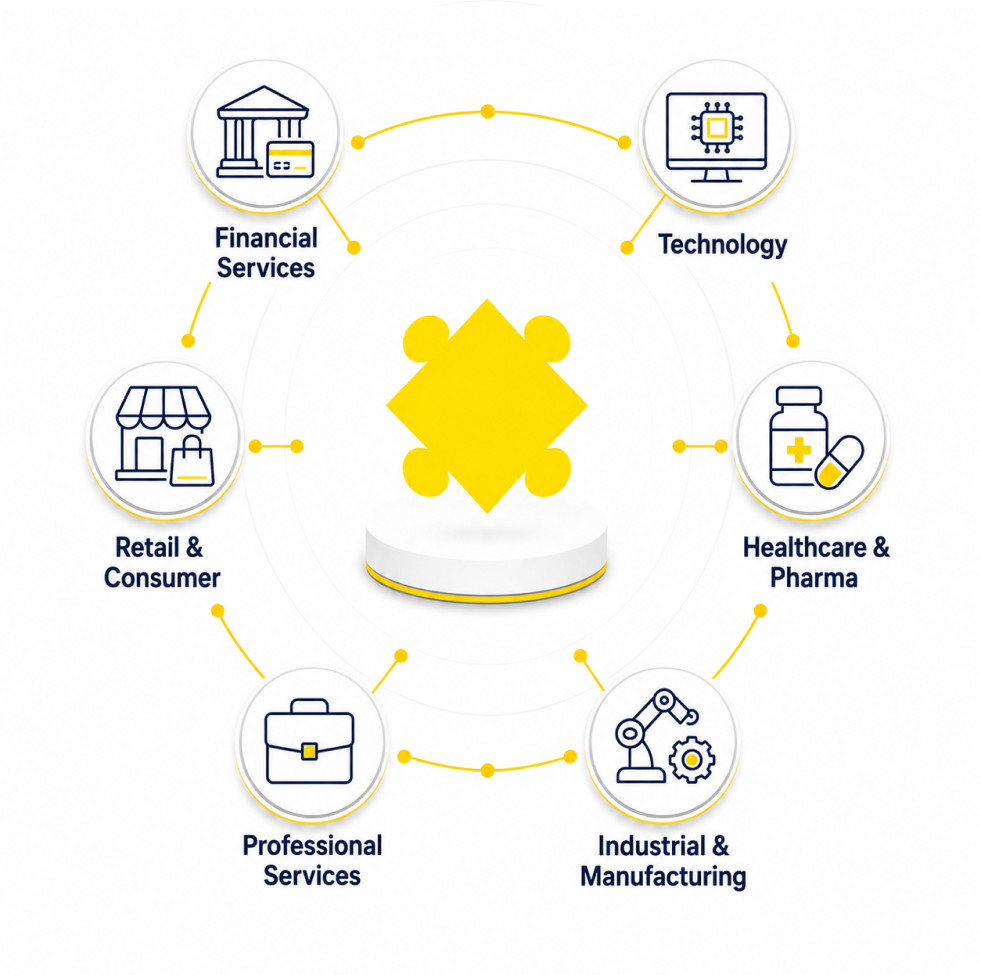
Industrial & Manufacturing

ERP simulation training for complex production and supply chain systems – role-based training for planning, procurement, and shop floor users who need different things from the same system.

Financial Services

CRM and compliance-critical software simulation – accurate, auditable system training for regulated workflows and customer data handling where errors have regulatory consequences.

Technology

Custom and proprietary software simulation for internal tools and platforms – particularly relevant for CMS deployments, internal portals, and engineering tooling rollouts.

Healthcare & Pharma

Compliance-critical system training for clinical and regulatory platforms – error-recognition scenarios for systems where mistakes carry patient safety or regulatory risk.

Retail & Consumer

POS and inventory system simulation at scale – fast, role-based training for frontline staff across multiple locations during time-pressured system rollouts.

Professional Services

CRM and practice management system training for client-facing teams – ensuring consistent system use that supports client relationship visibility and business development.

RELATED TRAINING TOPICS AND HOW CONSTELLAR BUILDS THEM

Training areas that frequently complement software simulation:

HOW WE BUILD IT:

Custom eLearning

Realistic, role-based, and built for rapid updates as systems change - the primary format for software simulation.

Learning Consulting

For large-scale system rollouts - start with a senior-led Training Needs Analysis to scope role-based simulation requirements before go-live.

Frequently asked questions

Yes - and this is non-negotiable for us. A simulation that doesn't match the live system misleads users rather than preparing them. Our senior instructional designers work directly from your system configuration, using your actual interface, terminology, and workflows. Every simulation is validated against the live system before it reaches a learner.
Show-Try-Test is a three-stage simulation structure: the Show stage demonstrates a workflow through a guided walkthrough; the Try stage allows learners to practise the same workflow with cues and guidance; the Test stage requires learners to complete the workflow independently without support. Each stage builds the foundation for the next: demonstration alone produces passive familiarity, guided practice builds procedure, and independent assessment builds confidence. Our Censhare CMS case study demonstrates this in action.
Yes - and we have the case study to prove it. Our Censhare CMS pre-work programme was designed as a structured digital pre-work that front-loaded foundational knowledge, so live training time could be spent on applied practice and edge cases rather than basic navigation. The result was a measurable reduction in hands-on session time without compromising system competency.
Technology Skills training covers broader digital capability - AI literacy, data skills, digital fluency, and software adoption at a general level. Software Simulation is specifically about building system-level proficiency through realistic, workflow-based practice in a replica of your actual system. The two complement each other: Technology Skills builds the broader digital mindset; Software Simulation builds the specific system competency.
AI-assisted tools support the development of realistic interface replicas, scenario variants across user roles, and rapid updates as system configurations change. Our senior instructional designers validate every simulation against the actual system configuration and design the Show-Try-Test progression - these are the structural decisions that determine whether simulation training translates into genuine live-system competency.

Ready to Build Simulation Training That Accelerates Adoption and Reduces Go-Live Errors? Let's Talk

Tell us about your software rollout – the system, the timeline, the user roles, and where previous rollouts have struggled. A senior instructional designer will respond within 1 business day with an honest assessment of the right simulation approach for your specific context.